
Skip to content

Bootstrap Basics

A practical introduction to Bootstrap in Wappler: grid, utilities, and the core component workflow in Design View.

Bootstrap is a CSS framework: a shared set of class names that gives you a responsive grid, consistent spacing, and ready-to-use components.

NOTE: Bootstrap answers: ‘How should the UI be laid out and styled?’ App Connect answers: ‘What data should be shown?’ Server Connect answers: ‘What data is allowed and how do we produce it?’

Grid
Rows + columns
Responsive layout
Utilities
Spacing, sizing
Quick tweaks
Components
Cards, navbars
Forms, modals
You don’t need to memorize class names.
Learn the patterns: grid + spacing + a few components.
Then you can read (and tweak) almost any Bootstrap layout.

Bootstrap is mainly CSS (plus optional JS for interactive components). It works by applying classes to HTML elements:
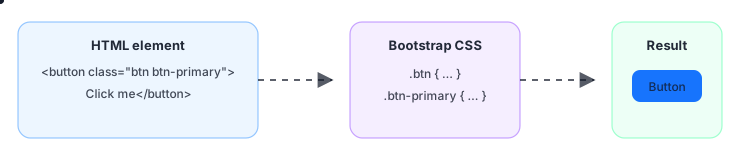
Bootstrap maps class names to styling

So ‘learning Bootstrap’ is mostly learning a vocabulary of classes for layout, spacing, and common UI patterns.
Classes are the language: you describe layout and style with names.
CSS does most of the work; optional JS powers interactive components.
You learn patterns, not every class.
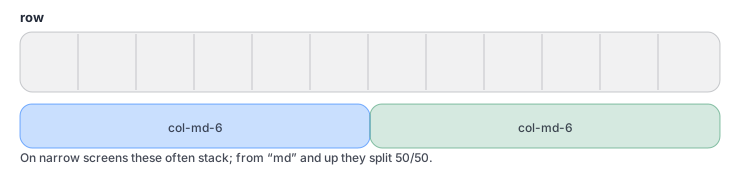
Bootstrap grid: row with 12 columns and a 6/6 split
Rows contain columns. Columns add up to 12.
On small screens, columns usually stack.
Responsive classes change the layout at breakpoints.
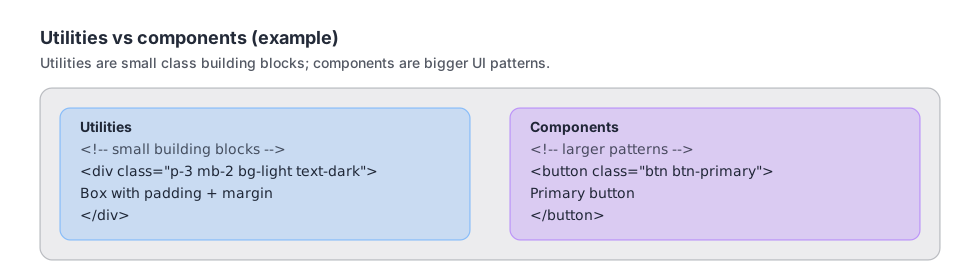
Bootstrap utilities vs components example

TIP: You don’t have to memorize class names: start with layout (grid), spacing (p*/m*), and a few components you use often.

Utilities = quick tweaks (spacing, alignment, colors).
Components = bigger patterns (cards, navbars, forms).
Learn a few you use daily, then expand as needed.

TIP: When something looks wrong, ask: is it a layout/styling problem (Bootstrap), a data-binding problem (App Connect), or an API/data problem (Server Connect/DB)?

Bootstrap
Layout + styling
classes
App Connect
Bind data
to UI
Server Connect
APIs + rules
safe data
Bootstrap builds layout + styling quickly.
App Connect fills that UI with live data and reacts to actions.
Server Connect protects and produces the data (APIs, validation, permissions).

Bootstrap becomes easy once you recognize the pattern: classes describe layout, spacing, and components. You can now read most Bootstrap markup and make confident layout changes. Next, we’ll switch back to data: databases and your first end-to-end data flow.

Layout
Grid: rows
+ columns
Spacing
Utilities
p*/m*
Components
Cards, nav
forms
Bootstrap = layout vocabulary you can read and tweak.
You’re aiming for patterns, not memorizing class names.
Next: data basics (databases) and your first full data flow.

Continue to Databases 101.