
Grid
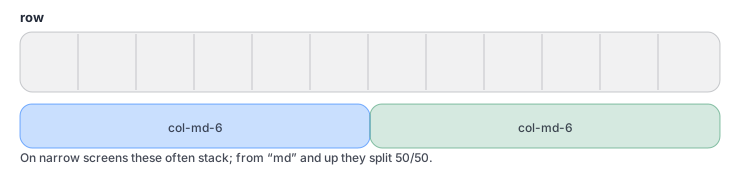
Rows + columns
Responsive layout
Responsive layout
A practical introduction to Bootstrap in Wappler: grid, utilities, and the core component workflow in Design View.
Bootstrap is a CSS framework: a shared set of class names that gives you a responsive grid, consistent spacing, and ready-to-use components.
NOTE: Bootstrap answers: ‘How should the UI be laid out and styled?’ App Connect answers: ‘What data should be shown?’ Server Connect answers: ‘What data is allowed and how do we produce it?’
Bootstrap is mainly CSS (plus optional JS for interactive components). It works by applying classes to HTML elements:
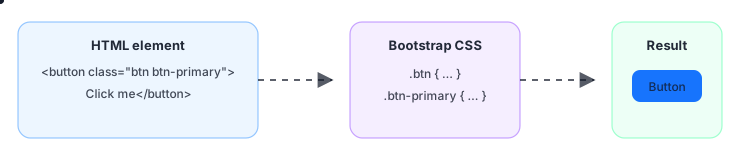
So ‘learning Bootstrap’ is mostly learning a vocabulary of classes for layout, spacing, and common UI patterns.
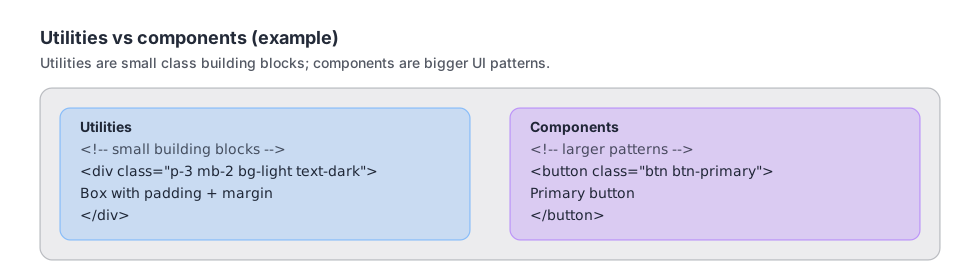
TIP: You don’t have to memorize class names: start with layout (grid), spacing (p*/m*), and a few components you use often.
TIP: When something looks wrong, ask: is it a layout/styling problem (Bootstrap), a data-binding problem (App Connect), or an API/data problem (Server Connect/DB)?
Bootstrap becomes easy once you recognize the pattern: classes describe layout, spacing, and components. You can now read most Bootstrap markup and make confident layout changes. Next, we’ll switch back to data: databases and your first end-to-end data flow.
Continue to Databases 101.