
Skip to content

Databases 101

Databases in Wappler, from zero to query: connections, choosing drivers, and turning tables into usable data.

A database is usually made of tables.

Row = one item (record)
Column = one piece of data (field)
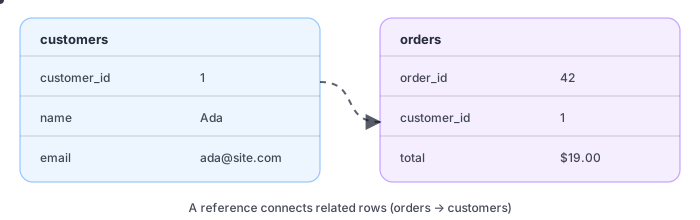
Two tables with a reference between them

Tables can reference each other so you can keep data organized (and avoid repeating the same info everywhere).

The database is the system of record (the source of truth).
The server is the safe gatekeeper between the UI and the database.
Most apps are just ‘query data’ + ‘show data’ repeated.

Database stores data.
Server Connect reads/writes and enforces rules.
App Connect displays data and triggers actions.

So you typically don’t connect the browser directly to the database — the server sits in the middle as the safe gatekeeper.

Database
Stores
truth
Server Connect
Queries +
rules
App Connect
Renders +
actions
Browser shouldn’t talk directly to the database.
Server is the safe boundary: validate + authorize + query.
Client renders the results and triggers actions.

A relational database is commonly organized like spreadsheets.
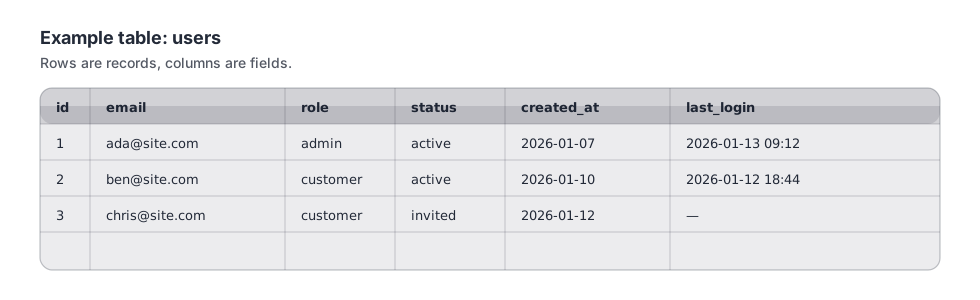
Example users table with rows and columns
Table = a type of thing (users).
Row = one thing (one user).
Column = one property (email).

TIP: In Wappler, Database Manager can set up references visually (so you can focus on the model, not the SQL details).

Reference
Connect tables
by IDs
One-to-many
Customer →
many orders
Many-to-many
Use a link
table
A table can reference another table to connect related data.
One-to-many: one customer can have many orders.
Many-to-many: usually modeled with a separate link table.
Relationships reduce duplication and keep data consistent.

Most apps need CRUD operations: select, insert, update, and delete.

This is what your server (Server Connect) does when your UI (App Connect) needs data.
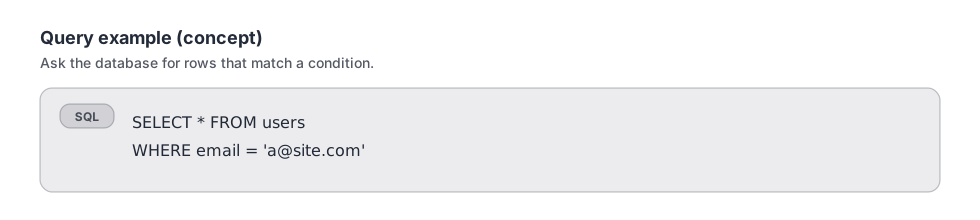
SQL select example
Most features boil down to CRUD: create/read/update/delete (insert/select/update/delete).
The server runs queries, not the browser.
The UI asks for data; the server returns safe results.

Databases are where your app’s long-term data lives: tables store records, and references connect related records. Next, we’ll walk through a first end-to-end flow: database → Server Connect API → page.

Store
Tables +
rows
Relate
References
connect data
Flow
DB → API →
page
Database stores truth; server controls access.
References keep data organized and consistent.
Next: walk the full data flow end-to-end.

Jump to the first data flow tour.