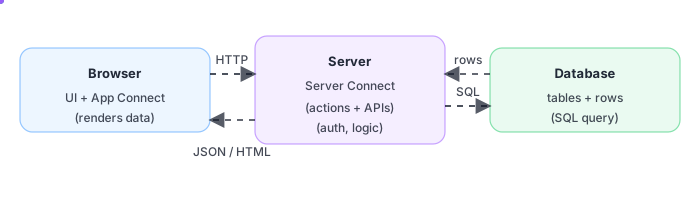
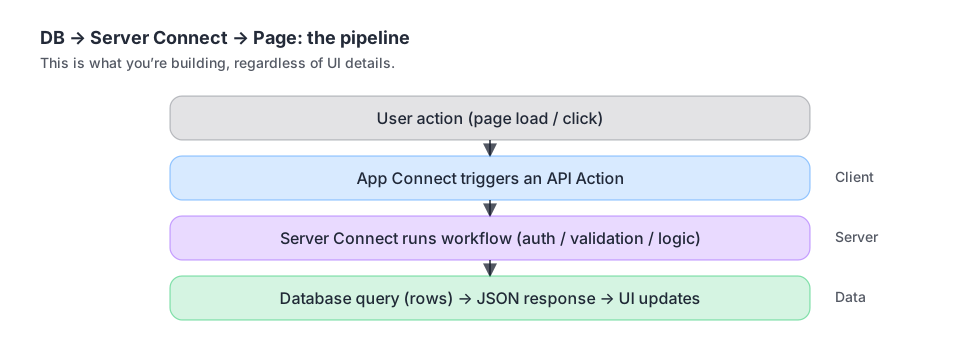
A typical dynamic page is a simple pipeline:
IMPORTANT: Avoid the beginner trap: pages, APIs, and the database are not separate topics — they are one pipeline.
Stores records
Source of truth
Queries + rules
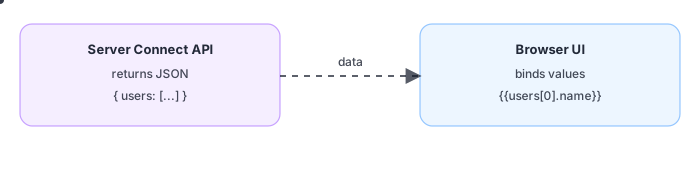
Returns JSON
Calls API
Renders UI
Think in pipelines, not tools: DB → API → UI.
Server is the safe boundary between UI and data.
If you can trace the pipeline, you can debug calmly.
TIP: Once you can reliably move data DB → API → UI, you can build CRUD, dashboards, auth, and integrations much faster.
Endpoint
+ output
Tables
matter
JSON
→ UI
Find the
break
What a Server Connect API is (and why it returns JSON).
How the database influences the API output shape.
How App Connect takes JSON and renders it into the UI.
Where to debug when data looks wrong.
App Connect runs in the browser and turns events into UI updates.
So App Connect is your client-side data binding and UI updates.
Calls APIs (or listens to events).
Receives JSON data.
Updates the DOM (what you see).
If the UI is wrong, check the JSON first.
NOTE: In Wappler, Database Manager handles connections and schema; Server Connect uses those connections for queries.
Credentials +
host
Tables +
fields
Run a
simple query
Create a database connection (host, user, password, database).
Verify you can list tables and run a simple query.
Use this connection in Server Connect queries.
TIP: If the API returns JSON you can understand, your UI becomes much easier to build and debug.
A URL you
can call
Fetch +
shape data
Predictable
output
Create an API Action (endpoint).
Add a database query step.
Return the query output as JSON.
Test the endpoint to see JSON results.
Fetch JSON
data
Repeat lists
text bindings
UI updates
automatically
Create an App Connect API Action on a page that calls your Server Connect endpoint.
Bind the returned data to UI components (repeat lists, text bindings, etc.).
Trigger the API on page load or on a user event.
The UI updates automatically when data changes.
This is the foundation for almost everything: auth, dashboards, CRUD, and integrations.
Data lives
here
Safe JSON
output
Bind JSON
to UI
Database holds truth.
Server Connect turns truth into safe JSON.
App Connect renders JSON into the UI.
You’ve connected the mental dots: the database stores records, Server Connect turns them into a safe JSON response, and the page (App Connect) renders the result. Next, skim the terminology reference so the words match what you now understand.
DB holds
records
Server checks
access
Page renders
data
If the UI is wrong, inspect the JSON response.
If the JSON is wrong, inspect the server workflow.
If the server is wrong, inspect the database query/model.
Continue to Web App Terminology.