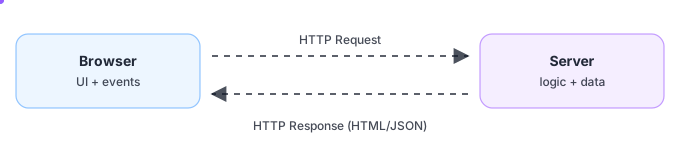
A web app is a conversation between a browser and a server: the browser sends a request, the server does work, and the browser renders the response.
TIP: Once you ‘see’ this loop, debugging becomes much calmer: you just ask, “which part of the loop is wrong?”
Makes requests
Renders UI
Runs logic
Talks to data
HTML / JSON / files
Status codes
You do something in the browser (open a page, click a button).
The browser sends a request to the server.
The server runs logic (auth, validation, database queries).
The server returns a response (HTML or JSON).
The browser shows it to the user.
Imagine you open a products page.
NOTE: Different tech stacks change the implementation details, but this flow stays the same everywhere on the web.
Go to
/products
Query
products
HTML
or JSON
Show
the list
Browser requests `/products`.
Server loads products from the database.
Server responds with HTML (SSR) or JSON (CSR).
Browser renders the list of products.
When something doesn’t work, it almost always breaks in one place in the chain.
IMPORTANT: Wappler’s tooling is designed to make each part of this chain visible: requests, responses, server step output, and live data in the browser.
URL/method
payload
Validation
permissions
Status +
shape
Bindings
format
The request is wrong (URL, method, payload, missing auth).
The server rejects it (validation, permissions, errors).
The response is unexpected (wrong shape, empty data, error status).
The UI renders it incorrectly (binding, formatting, logic).
At the heart of the web is request → response:
Browser sends an HTTP request (URL, method, headers, body).
Server runs logic (auth, validation, database queries, rules).
Server returns a response (HTML/JSON/files + status code).
Browser renders it and the loop repeats with the next interaction.
NOTE: Most real apps do both: return HTML for pages and JSON for API calls.
Pick the
handler
Validate +
authorize
Read/write
data
Receives requests and routes them to the right handler.
Validates inputs (correctness + security).
Authenticates users and checks permissions.
Talks to databases and other APIs.
Returns a response (HTML, JSON, or a file).
Wappler doesn’t change the web model — it makes it visual.
NOTE: You’ll see this mapping in the next tour (App Connect vs Server Connect).
Browser-side
UI + bindings
Server-side
API workflows
App Connect runs in the browser: it updates the UI and calls APIs.
Server Connect runs on the server: it validates, queries data, and returns JSON.
Together, they implement the same request → response loop you just learned.
Different server stacks can implement the same web flow.
Examples: Node.js, PHP, Python/Ruby/Java/.NET
Wappler can generate + manage projects for multiple server targets, but the concepts stay the same.
JS on
server
Traditional
hosting
Python/.NET
Java etc.
Node.js, PHP, Python/.NET: different stacks, same HTTP concepts.
Pick a target based on your hosting/team needs.
Wappler keeps the workflow visual across targets.
You’ve seen the core web loop: the browser makes a request, the server runs logic, and the response comes back (HTML or JSON). Next, we’ll map this to Wappler’s building blocks: client-side App Connect and server-side Server Connect.
Request →
response
Logic +
data
Render +
interact
When debugging, ask: request? server logic? response? rendering?
Keep your data + permissions on the server.
Next up: how Wappler maps to this model.
Jump to the App Connect + Server Connect big-picture tour.