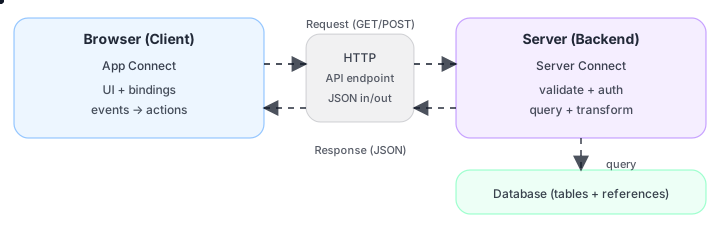
Wappler helps you build both halves of a modern web app: the browser UI (client) and the server workflows (backend).
IMPORTANT: Every web app has these parts. Wappler’s advantage is making the connections clear while still generating real, editable code.
UI + events
Runs in browser
Workflows + rules
Runs on server
Tables + records
Stored safely
Client (browser) renders and reacts to events.
Server runs trusted logic and returns data.
Database stores long-term truth; server is the gatekeeper.
UI +
bindings
Rules +
workflows
API
responses
Layout +
components
What runs in the browser vs on the server (and why that separation matters).
Why UI interactions often become an API call that returns JSON.
Where data lives (database) and why the server is the gatekeeper.
Where Bootstrap fits (layout + components), separate from data binding.
Think in two big layers, plus the data layer:
In practice: App Connect triggers a request → Server Connect builds a JSON response → App Connect renders it in the UI.
Client (browser): UI, events, state, rendering.
Server (backend): workflows, validation, permissions, data access.
Data (database): tables + references, queried by the server.
IMPORTANT: App Connect expressions are not JavaScript. They’re a declarative binding language.
Show live data
in the UI
Clicks, submits
page load
Call APIs
update state
Runs in the browser (client-side).
Binds data to the UI (reactive updates).
Turns user events into actions (often an API call).
Keeps UI interactive without lots of custom JS.
NOTE: A Server Connect action is essentially an API endpoint you can call from App Connect.
Steps + logic
and output
Validate +
permissions
Structured
responses
Runs on the server (backend).
Executes workflows (queries, conditionals, transforms).
Enforces validation + permissions (safe boundary).
Returns structured JSON for the client.
A helpful mental model: Bootstrap shapes the UI, App Connect fills it with data, Server Connect protects and produces the data.
Shapes the
UI
Fills it
with data
Protects +
produces data
Design UI visually (and still generate clean code).
Create API workflows visually (and still have real server-side logic).
Bind UI to server data predictably (strong output schemas).
Use Bootstrap for layout + components, while App Connect focuses on data binding.
App Connect runs in the browser, Server Connect runs on the server, and the database stores long-term data. Most features are just this loop repeated: UI event → API call → JSON response → UI updates.
User does
something
Server runs
workflow
UI binds
new data
UI event → API call → JSON response → UI updates.
Server is where you validate and protect.
Client is where you render and interact.
Continue to rendering models (SSR vs CSR).