
Skip to content

Why Wappler

A short, UI-light overview of what makes Wappler powerful: real files, full-stack workflows, portability, and debugging.

In a few minutes you’ll see why Wappler is worth learning: it helps you build real, portable, full-stack apps — and it teaches you modern web development as you go.

IMPORTANT: Nothing is locked away. Wappler generates real HTML/CSS/JS and real server workflows/APIs — files you can edit, version-control, and host anywhere.

Real files
HTML / CSS / JS
APIs / workflows
Full stack
UI + data + server
Learn by doing
Deploy anywhere
Portable projects
No lock-in
Real project files you own.
Visual workflows that grow your skills.
Deploy anywhere, collaborate with anyone.

Think of Wappler as a productivity layer on top of real web tech:
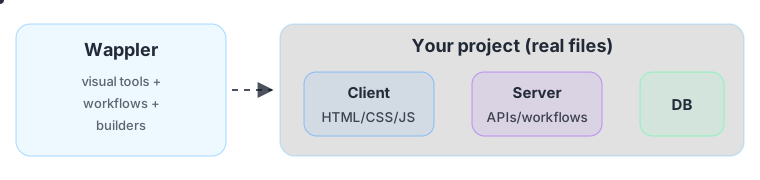
Wappler generates real project files
You can host anywhere (no vendor lock-in).
You can version control your work (Git/SVN/etc.).
You can drop into code whenever you want.

A key advantage of learning Wappler: you’re learning modern web standards and technologies — the skills transfer everywhere.
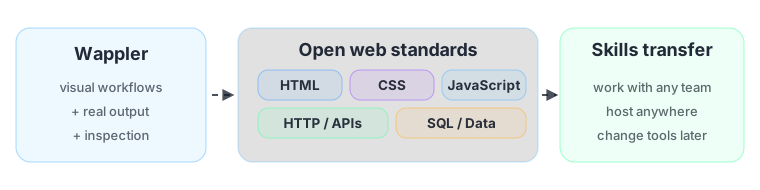
Wappler teaches open web standards

IMPORTANT: Wappler is not a closed platform. It helps you build with real HTML, CSS, JavaScript, APIs, databases, and deployment workflows.

Your knowledge stays valuable even if tools change.
You can collaborate with developers using the same files and standards.
You keep full ownership and portability of your projects.

Become a full-stack developer (visually, by doing)

Section titled “Become a full-stack developer (visually, by doing)”

Wappler doesn’t just help you build faster — it actively teaches you the whole stack as you build real features:
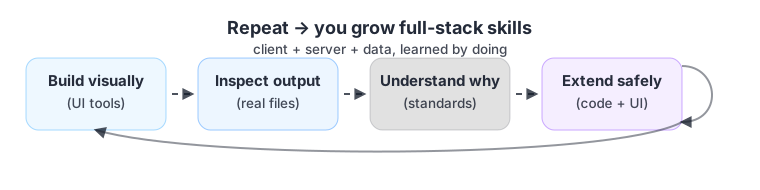
Learn by doing loop from visual build to full-stack skills

The goal isn’t to hide complexity — it’s to make it learnable, so you grow into a skilled developer while shipping real work.

You see how UI, data, and APIs connect.
You learn patterns that scale to complex apps.
You can inspect results and understand why something works.

End-to-end flow (design → data → deploy)

Section titled “End-to-end flow (design → data → deploy)”

Wappler shines when you build a complete feature across layers:
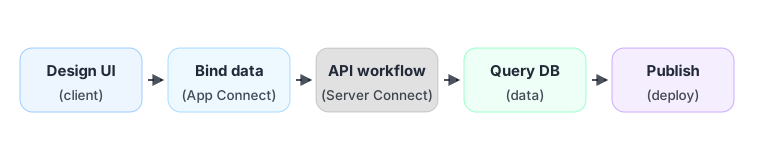
End to end workflow

Learning the UI makes more sense when you see this as one connected workflow, not isolated features.

Design your UI with real components.
Connect data and build APIs/workflows.
Deploy with repeatable, real-world setups.

Debugging and inspection (confidence builders)

Section titled “Debugging and inspection (confidence builders)”

Fast feedback is a superpower. Wappler helps you see what’s happening, fix it, and verify quickly:

Inspect
Requests / responses
Step output
Log
See what happened
and why
Validate
Rules / auth
Protect boundaries
Iterate
Fix → run → verify
Fast loop
Inspect data flowing through your app (requests, responses, outputs).
Debug server workflows with step output and logs.
Validate and protect data at the server boundary.
Iterate quickly with live reload and predictable bindings.

AI is most useful when it speeds up the boring parts — while you stay in control.

Use it for drafts and explanations — then verify and refine like a pro.

AI suggests
Draft boilerplate
Explain code
You review
Validate output
Keep standards
You own it
Commit real files
No lock-in
Draft a first version.
Explain unfamiliar code.
Refactor safely with review.
Generate test data or examples.

Wappler’s value shows up when you connect the layers: UI, API workflows, and data. Next, start the Learning Basics path to understand how modern web apps work — then everything in the UI will make more sense.

Start Learning the Basics.